Over 60% of short-term rental operators already automate with AI somewhere in their operation, per Hostaway’s 2026 industry report, and almost everyone automates something simpler first. This guide is the whole map of how to automate Airbnb management: the classic layer that has existed for years, the AI layer that now runs on top, and the order to set them up.
Here is the full picture before the steps:
| What you automate | The classic automation (no AI) | What the AI layer adds | Step |
|---|---|---|---|
| Guest messages | Scheduled messages on a timer | Real answers to real questions, drafted from your data | 1, 5 |
| Check-in | Smart locks with per-stay codes | Lock questions answered instantly, issues become tickets | 2 |
| Calendars | Channel and iCal sync | Date changes ripple into cleaning and messaging on their own | 3 |
| Cleaning | Rule-based turnover scheduling | Reminders, photo-proof reports, remote pass or fail | 4 |
| Knowledge | A house manual PDF nobody updates | Team chat scanned into a living knowledge base | 6 |
| Operations | Checklists and memory | An AI agent that flags stalls and proposes fixes you approve | 7, 8 |
The classic layer: automation without AI
These four steps have been standard for years, and they are still the right place to start. None of them involves AI: they are timers, rules and hardware.
| 1 | Scheduled messages. Airbnb ships this natively: check-in instructions the day before arrival, a checkout reminder the last morning. Airbnb automated messages on a timer cover the predictable half of guest communication in about an hour of setup. |
| 2 | Smart locks. A lock that issues a per-stay code ends key handoffs and “I’m locked out” calls at midnight. Paired with your booking source, codes create and expire themselves. |
| 3 | Calendar and channel sync. One calendar of record across Airbnb, Vrbo and direct bookings, synced by your PMS or iCal, is what makes every later automation trustworthy. |
| 4 | Rule-based cleaning scheduling. Checkout triggers a cleaning task, assigned by rules. We compared the tools that do this in our cleaning apps roundup. |
The limit of this layer is that timers and rules only handle what you predicted. A guest asking “is the fridge fixed?” hits a scheduled message system and gets silence.
The AI layer: automation that handles the unpredictable
| 1 | AI guest replies with human approval. The AI drafts answers to the questions timers cannot script, grounded in your bookings and knowledge. You approve before anything sends. We compared the AI tools by what data each can see. |
| 2 | A knowledge base that feeds itself. Team chat in Slack, WhatsApp or Signal gets scanned for facts worth keeping, and one approval turns “the water heater needs the button pressed twice” into an answer the AI gives forever. |
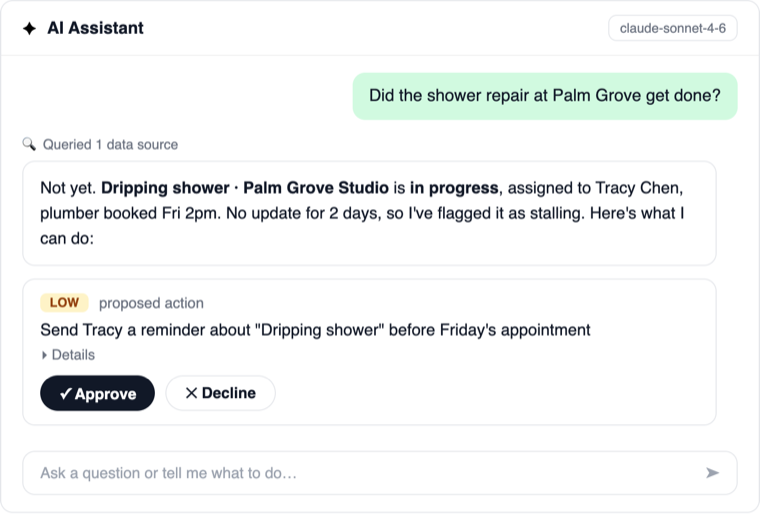
| 3 | AI monitoring on operations. Proactive scans flag stalled maintenance tickets, sub-5-star reviews and escalations daily, so nothing waits for someone to remember it. |
| 4 | An agent that executes with your approval. The end state of Airbnb automation: the AI proposes the action (a nudge, a task, a reply), you approve with one click, it executes. Outbound and paid actions always wait for you. |
The right order to set it up
That is how to automate Airbnb end to end. Classic layer first, in a weekend: scheduled messages, then the smart lock, then calendar sync, then cleaning rules. Add the AI layer the week after, one step at a time, and keep approval on for everything until trust is earned. Full airbnb automation software stacks like HostGenix bundle steps 4 through 8, so the AI layer is a connection, not a project.
| “ | Timers handle what you predicted. The AI layer handles everything you did not. |
FAQ
Can you automate Airbnb completely?
The mechanical 80%, yes: messages on schedule, codes, cleaning tasks, and AI drafts for the rest. The judgment calls stay yours by design, which is why every good airbnb automation tool keeps a human approval step.
What should I automate first for my Airbnb?
Scheduled messages: an hour of setup removes the most repetitive work. Smart locks and calendar sync next, then cleaning rules, then the AI layer for everything the timers cannot script.
How much does it cost to automate an Airbnb?
The classic layer is mostly cheap or built in: scheduled messages are free, smart locks are a one-time purchase per door, and cleaning tools start free. AI platforms run roughly $10 to $20 per listing per month, so a 10-listing operation automates for about the cost of one cleaning per month.