Every “AI feature” you’ve been sold in rental software is, underneath, the same feature: it answers messages. In Hospitable’s 2026 industry report (554 hosts and managers), 80.9% use AI for guest communication and 62.6% for pricing. That’s roughly where the list ends.
Meanwhile McKinsey’s 2025 State of AI survey finds 23% of companies already scaling agentic AI, meaning AI that carries out work rather than just holding a conversation.
Short-term rentals are behind, and the reason is structural: an Airbnb AI assistant can only be as useful as the data and the actions you wire it to. Nothing in the typical host stack connects calendar, messages, tasks and cleaning into one path.
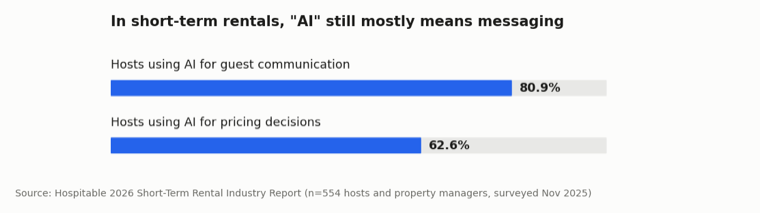
Source: Hospitable 2026 Short-Term Rental Industry Report (n=554). Agentic AI figure: McKinsey, State of AI 2025.
What “AI” means in rental software today
- Messaging tools like Besty AI (its own words: “AI-Powered Guest Messaging”) auto-reply, score sentiment, upsell gap nights, all inside the inbox.
- PMS inbox AI drafts replies where your reservations live. Still the inbox.
- ChatGPT in another tab helps you write anything, but it doesn’t know which unit checks out today or which task has been stuck since Tuesday, so you retype context all day.
All of these are useful, and all of them do the same narrow job. They’re tools you operate, not an employee working your system with you.
What an AI employee for Airbnb looks like
We built HostGenix’s assistant the way you’d onboard a new hire: real system access, a written job scope, and no authority to act alone.
Concretely: its tools are capped by your permissions, its actions come from a fixed whitelist, and every write waits for your click.
Ask anything, from any page. The assistant sits behind a floating button across the whole back office, with a dozen read-only lookups spanning reservations, cleaning tasks and reports, ops tasks, reviews, on-call shifts, statements, your team, guest conversations and your knowledge base, plus live Hostaway availability.
Ask “Which listings have check-ins tomorrow?” and the answer comes with receipts: it lists the data sources it queried, and each reply shows its own token cost.
It also carries page context. Ask “what’s blocking this one?” from a task page and it knows which task you mean.
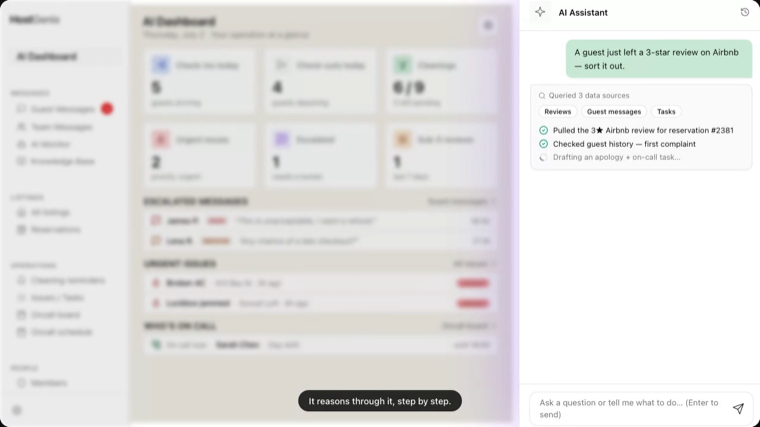
It proposes; you approve. Tell it “create a repair task for the leak in Unit 5” and it doesn’t touch the database. It files a proposal card: command name, risk badge, arguments you can expand.
Approve, and the action executes under your account, re-validated and logged end to end. Decline, and it dies.
The whitelist today is four commands: create an ops task, update one, and two Lark nudges (guest waiting too long, task gone stale). Commands to message guests, move money or delete things simply don’t exist. That limit is deliberate, and it’s why you can let the assistant near real operations.
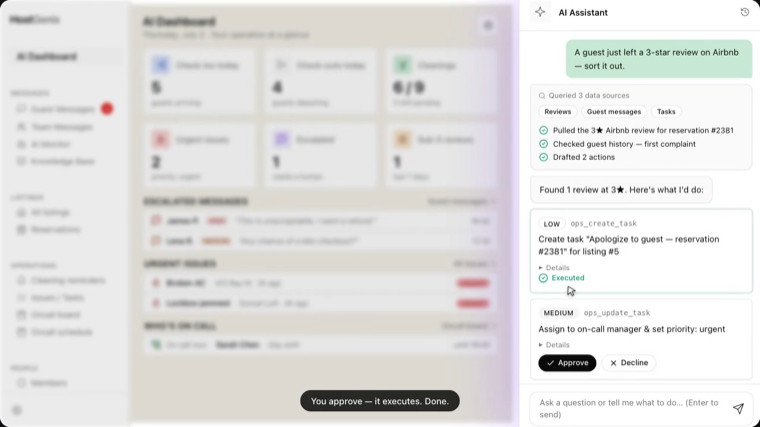
Switch on the watch, and it works your SOP. Flip on the proactive scan (off by default, per rule) and every 15 minutes the assistant checks your operation against your thresholds: guests unreplied past 30 minutes (yours to set, 5 to 1,440), tasks stalled past 3 days, guest-reported issues, even a sub-5★ review worth a follow-up task.
Take a real case. A guest messages “the shower drain is clogged.” The inbound classifier reads it as a maintenance issue and marks the conversation. The scan picks it up and files a proposal in the Agent approvals inbox on your dashboard: create a repair task.
You approve, and the task is created, the on-call assistant is auto-assigned (urgent ones pull in the on-call manager), and the cleaner gets the WhatsApp ping to go take a look. That whole chain cost you one approval.
And it double-checks before acting: approve a “guest waiting” nudge after someone already replied, and it skips instead of firing a stale alert.
What actually changes
The manual chain this replaces is the worst kind of work: see the issue, judge it, open a ticket, assign it, notify someone. That’s judgment glue, and it never shows up in a time sheet.
The assistant carries the chain; you keep the two clicks that matter: Approve and Decline. Everything it does is auditable: who approved what, when, with which arguments.
Every reply is priced to the token, and the brain is swappable: GPT-5.5, GPT-4o or Claude Sonnet 4.6 (the default), one dropdown away.
That’s also why this isn’t “unified software with a chatbot.” Your thresholds set what it watches, your knowledge base grounds what it says, your permissions cap what it sees, and your approvals gate what it does.
It’s fitted into your workflow rather than sitting beside it.
FAQ
What is an Airbnb AI assistant?
An AI that works inside your property-management system instead of a chat tab: it answers operational questions from live data (reservations, cleaning, tasks, reviews), watches for problems on a schedule you set, and proposes actions (like creating a repair task) that only run after you approve.
Can it do anything without my approval?
No. Reading data is capped by your permissions; writing anything goes through a proposal card you approve or decline. Its action list is a fixed whitelist of four operational commands. Messaging guests or spending money isn’t on it.
Which AI models does it run on?
A whitelist you can switch per tenant: GPT-5.5, GPT-4o and GPT-4o mini from OpenAI, and Claude Sonnet 4.6 (default) and Claude Haiku 4.5 from Anthropic. Every message shows its token cost, so you always know what the assistant spends.
Want an employee that already knows your calendar on day one? It takes about 15 minutes to connect and ask your first question.
Related reading: how to automate Airbnb guest messages without losing the 5-star touch, and how cleaning management fits into the same system.