Your Airbnb response rate is the percentage of new inquiries and booking requests you answer within 24 hours, and Airbnb’s help center says a low one affects your Superhost status and search placement. Most advice about it quotes the rules loosely, so here is how the metric actually works, straight from the official documentation.
Key takeaways
- A reply within 24 hours counts, and declining counts too. Letting a request expire is what hurts you.
- There are two windows: a public 30 day rolling metric, and a 12 month Superhost review assessed every quarter.
- Superhost status needs 90% of new messages answered within 24 hours.
- Follow-up messages never affect your rate. Only the first reply in each thread is measured.
Knowing the rules is the easy half. The hard half is coverage: in Touch Stay’s 2026 survey of 1,363 hosts, 56% still handle guest communication manually.
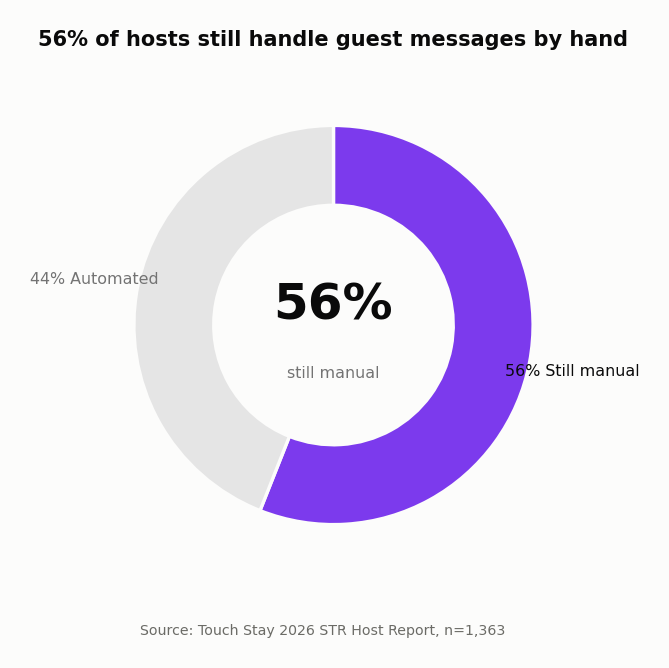
Source: Touch Stay, 2026 STR Host Report (n=1,363).
How is your Airbnb response rate calculated?
Airbnb defines it as the share of new inquiries and reservation requests you responded to within 24 hours over the past 30 days. The Superhost calculation uses a different window: your first reply to each new message thread over the past 12 months.
Under the official rules, all of these count as a response:
- Accepting or pre-approving a request.
- Declining a request.
- Sending a message.
- Sending a special offer.
Two details trip hosts up. A reply after 24 hours counts as late and still lowers your rate, and letting a reservation request expire counts as a non-response. Follow-ups inside a thread change nothing, so you never need the last word.
One more distinction: this is airbnb response rate vs response time. The rate tracks whether you replied inside the window, while the time averages how fast you were. If speed is your gap, start with why other hosts respond faster than you.
Does response rate affect your Airbnb search ranking?
Airbnb’s help center says it plainly: a low response rate impacts your Superhost status and search placement. The Superhost bar is exact: respond to 90% of new messages, and accept or decline new reservation requests, within 24 hours.
90%
of new messages answered within 24 hours keeps Superhost eligibility
Source: Airbnb Help Center
The review happens on the first of January, April, July, and October, each time looking back a full year. One bad month follows you into the next four assessments.
Where hosts actually lose points
If your Airbnb host response rate keeps dipping, the cause is usually coverage rather than carelessness:
- Overnight inquiries and time zone gaps burn the 24 hour window while you sleep.
- Busy season means five conversations across two platforms, and one always slips.
- Reservation requests quietly expire, which counts against you when a decline would not have.
- Declining feels risky, so hosts stall. The official rule is the opposite: declining counts as a response.
How to keep your Airbnb response rate at 100%
Templates and scheduled messages only cover the questions you predicted, and inquiries are exactly where new questions arrive. A perfect rate means every real question gets a real answer fast, with a person still in charge.
AI drafts the reply, you hit Send
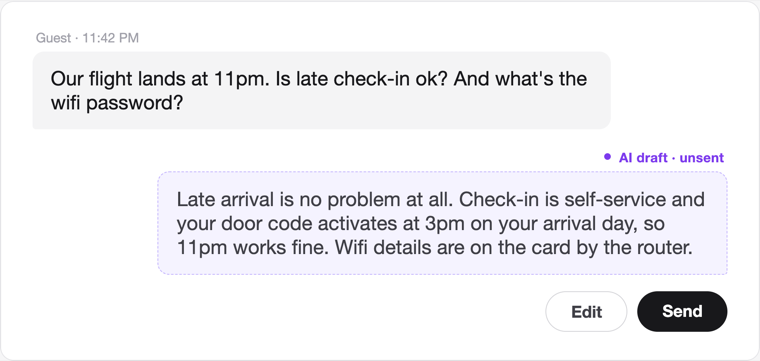
Every incoming message gets a drafted answer within seconds, day or night. It waits as an unsent bubble in your inbox: edit it, send it, or discard it. Nothing reaches a guest without you behind it.
Nothing waits past your threshold
If a guest goes unanswered past a threshold you set (30 minutes by default), the system escalates to your team channel so a person jumps in. It rechecks before alerting: already answered means no alert.
Urgent messages get a person first
Messages that read like safety or repair problems are flagged urgent and routed for human handling, with the on-call person notified. Automation should never be alone with a broken lock at 2am.
That is how you hold the line at 100% without handing guests to a bot. The AI does the drafting and the watching, and whether AI replies actually hold up comes down to what the AI can see. If you are starting from fully manual, begin by automating your guest messages and keep yourself as the approver.
FAQ
What happens if I decline an Airbnb inquiry?
Nothing bad happens to your response rate: declining counts as a response under Airbnb’s official rules. The damage comes from ignoring, because an expired request counts as a non-response.
How fast should an Airbnb host respond?
Within 24 hours protects your rate, but guests judge you on much faster replies. With AI drafted answers waiting in your inbox, most responses go out in minutes without you living on your phone.
What is a good response rate on Airbnb?
100% is the practical target, and 90% within 24 hours is the official Superhost floor. Below that, Airbnb says your search placement starts to feel it. For new Airbnb hosts the same math applies from the first inquiry, so early habits set the number.