80.9% of hosts already use AI somewhere in guest communication, per Hospitable’s 2026 industry report (554 hosts surveyed). Yet the best AI tools for Airbnb hosts all run on roughly the same models, so comparing them by “smartness” misses the point. The real question is what each AI can see: an AI that only knows your listing answers WiFi questions, and an AI wired into your tickets, team chat and bookings answers everything else.
Key takeaways
- Every Airbnb AI uses similar models. The ranking factor that matters is data access, not intelligence.
- Three kinds of AI tools: listing-only, PMS AI, and connected AI. Each layer can answer strictly more than the last.
- Manual knowledge bases fall out of date. Sources that sync themselves (chat, tickets, bookings) do not.
Three kinds of Airbnb AI, sorted by what they can see
Listing-only AI covers standalone Airbnb AI chatbot tools like HostBuddy and Guest Guru. You paste in your listing details and house manual, and the AI drafts guest replies from that snapshot. It handles “what is the WiFi password” well, and goes blank the moment a guest asks about anything that happened this week. We tested this gap in detail.
PMS AI is the layer Hospitable AI and Guesty AI occupy. Living inside the PMS adds real data: reservation dates, guest names, payment status. Knowledge beyond bookings still lives in a hand-maintained knowledge base, so every fact your team learns has to be typed in by someone before the AI knows it.
Connected AI is the layer HostGenix is built for (ours, and labeled as such): the AI reads the sources where operational truth actually lives, so nobody retypes anything.
| “ | An AI answer is only as good as the freshest source it can read. |
How HostGenix connects the sources, one by one
Team chat becomes knowledge, automatically
Your cleaner writes “water heater needs the button pressed twice” in Slack, WhatsApp or Signal team chat. HostGenix scans those messages, proposes the useful ones into a review queue, and one approval later the AI answers the next confused guest correctly. Nobody opened a knowledge base editor.
Tickets and maintenance history answer guest questions
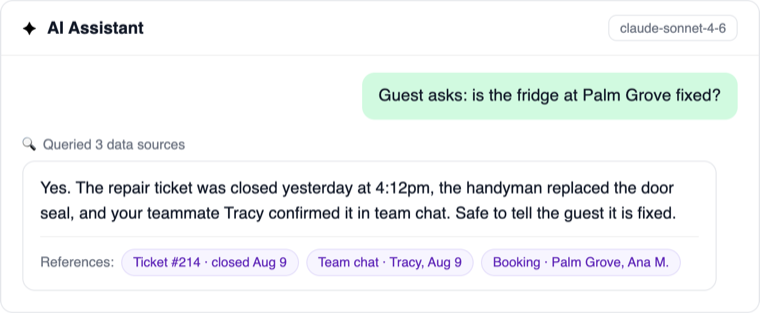
“Is the fridge fixed?” is unanswerable from a listing. The AI assistant queries your maintenance tickets directly, sees the repair closed yesterday, and drafts a reply with the fix confirmed. Most AI suggestions die exactly here, on questions about things the AI cannot see.
Booking and PMS data stay in sync
Reservations, date changes and guest details flow in from your PMS connection, so the AI never quotes last week’s checkout date. This is the layer PMS AIs have too; the difference is what sits next to it.
SOPs, house docs and a bot you can teach
Standard procedures and house documentation feed the same knowledge base, and anyone on the team can teach the AI with an @bot remember message in chat. Corrections land in seconds, not in the next documentation sprint.
Every answer cites its sources
Each AI reply carries references: which ticket, which chat message, which booking it drew from. You approve knowing why the answer is right, and audit later if anything looks off. This is also your safety layer: drafts wait for your approval, and the AI never sends on its own.
The comparison: what each AI tool can actually see
The same exercise as our guest messaging comparison: public documentation only, checked in August 2026.
| Data source | Standalone AIs HostBuddy, Guest Guru and similar |
Hospitable AI | Guesty AI | HostGenix |
|---|---|---|---|---|
| Listing and house details | ✅ | ✅ | ✅ | ✅ |
| Booking dates and guest details | ⚠️ with a PMS connection |
✅ | ✅ | ✅ |
| Team chat (Slack, WhatsApp, Signal) | ❌ | ❌ | ❌ | ✅ scanned into a review queue |
| Maintenance tickets and history | ❌ | ❌ | ❌ | ✅ assistant queries live tickets |
| Cleaning status today | ❌ | ❌ | ❌ | ✅ reports with photo proof |
| Learns from chat automatically | ❌ | ❌ | ❌ | ✅ plus @bot remember |
| Answers cite their sources | ❌ | ❌ | ❌ | ✅ references on every reply |
| Human approval before send | ⚠️ varies by tool |
✅ | ✅ | ✅ send, edit or reject |
❌ means the capability is not described in that tool’s public documentation as of August 2026; ⚠️ means partial or varies.
How to choose an AI tool for your Airbnb
Count the questions your AI failed to answer last month. If they were all listing facts, a standalone tool is enough. If they were “is it fixed, is it cleaned, what did we promise this guest”, those answers live in your operational data, and only an ai agent for Airbnb hosts that reads those sources can give them. That is the job HostGenix was built for.
FAQ
Is there an AI for Airbnb?
Yes, dozens: AI for vacation rentals spans standalone reply tools, AI features inside PMSs, and connected platforms like HostGenix. They differ less in intelligence than in data access, which is why this comparison sorts them by what they can see.
Do Airbnb hosts use AI?
Most do now: 80.9% use AI somewhere in guest communication per Hospitable’s 2026 report, and over 60% of operators use it across their operation per Hostaway’s. The gap is between hosts using it for drafts and hosts running operations on it.
Can you use AI for Airbnb guest messages safely?
Yes, with two guardrails: ground it in your own data so it stops guessing, and keep a human approval step so nothing sends itself. Answers that cite their sources make the approval a five-second check.
Will guests know they are talking to AI?
Not from quality, if the AI sees real data: answers with specifics read like a well-informed host. The tell is a generic reply that dodges the question, which is exactly what happens when the AI cannot see your operation.