About 1 in 3 AI suggested replies gets reviewed and never sent. The draft usually reads fine; the host just knows something the AI doesn’t. So why does AI get guest messages wrong often enough that hosts throw a third of its work away?
Where the unused third comes from
The drafts that die in review are rarely ungrammatical. They read fine, they are polite, and they answer from listing data while the real answer lives somewhere else. The host sees it in two seconds, deletes the draft, and types the truth by hand.
That is the pattern behind most skipped AI draft replies for Airbnb messages: we compared the main tools’ data sources last week, and nearly all of them write from the listing plus a knowledge section you fill in yourself. Three situations break that model daily.
Case 1: the repair the AI can’t see
A guest writes at 9pm: “Is the hot tub fixed yet?” A listing-only draft answers from the amenities list, where the hot tub is forever in perfect shape. The truth is a repair ticket: opened Tuesday, assigned to the on-call manager, parts arriving Thursday.
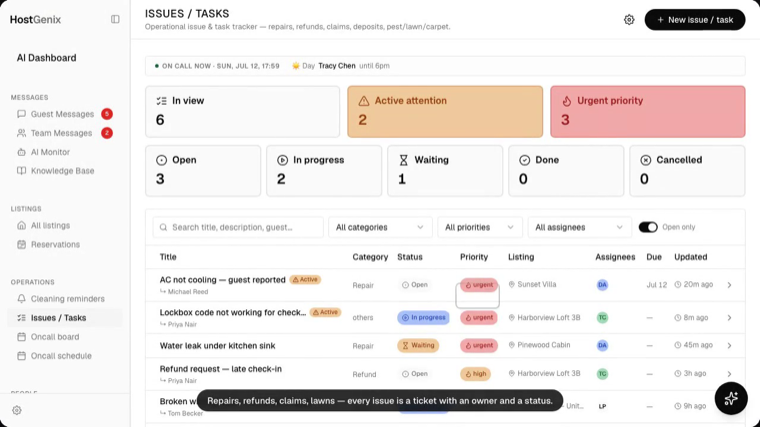
In HostGenix, the assistant queries the tasks board before answering. The draft can say “the heater part arrives Thursday, we’ll confirm the moment it’s running” instead of guessing.
Case 2: is the unit even clean yet?
“Can we check in two hours early?” has exactly one honest answer, and it depends on whether the turnover is done. That fact lives in today’s cleaning report, not in any listing field.
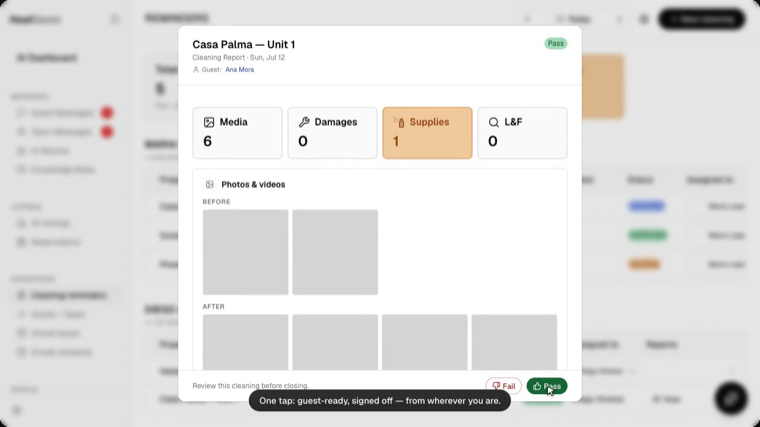
A connected draft checks the cleaning status first: report submitted, photos in, Pass clicked at 1:40 PM. Then it offers 2 PM with confidence instead of a form apology.
Case 3: the decision your team made yesterday
“Is the pool heated this month?” Someone decided that yesterday in your team chat, and no listing field ever heard about it. A draft written without that context gets it confidently wrong, which is worse than staying quiet.
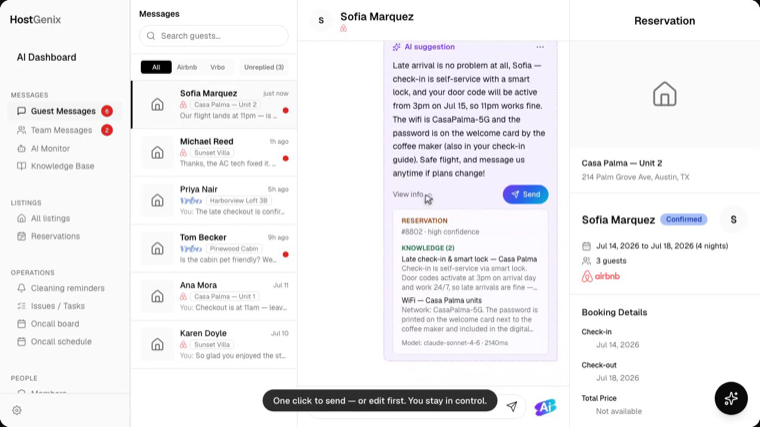
HostGenix scans team chat (Slack, WhatsApp or Signal) into the knowledge base, queues each fact for human approval, and the next draft cites that entry. View info shows the grounding before you hit Send.
So, why does AI get guest messages wrong?
Because reply quality is a data problem, not a model problem. The same model that fumbles the hot tub question answers it perfectly once it can see the ticket.
Your unused third is also your best diagnostic. The AI Response Monitor counts every accepted, edited and rejected draft by model and by category, which is how to audit AI replies to guests without rereading threads. When rejections cluster around repairs, cleaning or fresh decisions, you know exactly which data source to connect next.
For the full picture of what each tool can see, start with our data-source comparison. For the assistant that checks tickets and schedules before it answers, see the AI assistant that proposes actions you approve.
FAQ
Should I edit AI replies to guests?
Yes, whenever a draft misses context, and each edit should teach the system. In HostGenix an edited or rejected draft becomes a correction the AI learns from, so the same gap does not reappear next week.
How do I audit AI replies to guests?
Track three rates: accepted, edited and rejected. The AI Response Monitor reports them per model and per message category, so a dropping acceptance rate points straight at the data gap behind it.
Why do hosts skip AI suggested replies?
Mostly because the draft answers from listing data while the truth lives in a ticket, a cleaning report or a team thread. Connect those sources and the skip rate falls.
Fifteen minutes to connect, and the next draft answers from your whole operation.